Chat: conversations, the composer and handing over to an agent
Chat is for thinking things through. When it is time to change something, an agent or a Code pane takes the conversation, and nothing has to be retyped.
-
01Where chats live
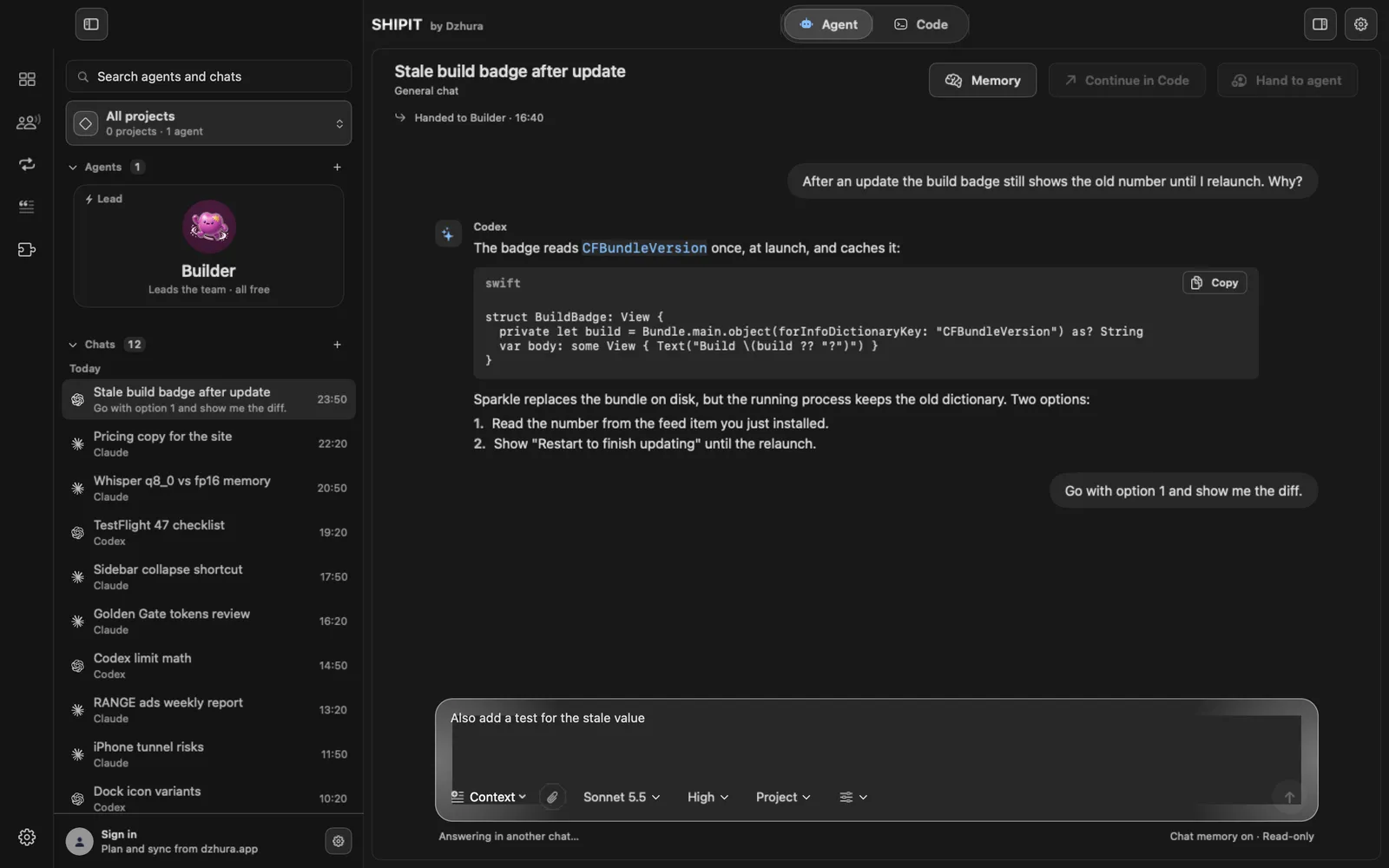
Chat is not a tab of its own but a section in the Agent tab. On the left, under the agents, is the Chats list, and the plus next to it opens a New chat.
On the Beginner level the section is hidden. Turn it on in
Settings › General, switch Chats section. -
02Type in the field at the bottom
The field at the bottom shows who you are writing to: Message ….
Entersends,Shift + Enterstarts a new line. Drop a file right onto the field or add it with the paper clip.Below the field you pick the model and the Reasoning effort. While an answer is coming, the send button turns into Stop.
-
03Give the chat a project folder
The Project pill below the field: Choose folder, and the chat can read the files of that project. Switch to general chat drops the folder.
Chat only reads. It never gets the right to change files that agents have, which is why the bottom right always says Read-only.
-
04Chat memory
The Memory button at the top shows what the chat keeps as context and lets you manage it. Turn memory off in the slider pill below the field: Use Chat memory.
The line under the field shows the state: Chat memory on or Chat memory off.
-
05Right-click a message
Right-click a message: Copy, Attach quote as context, Use as draft, Remember in Chat.
Right-click a chat in the list for Rename and Archive.
-
06Hand the chat to an agent
Agreed on what to do? Click Hand to agent, write what to do and pick the agent. With no text the agent gets Continue from this chat. It starts a new conversation, and the whole chat goes along as context.
A line Handed to Builder · 16:40 appears under the chat title, and a click on it opens that agent conversation.
TipThe button is active once the chat has messages and is not answering right now.
-
07An agent reads a chat
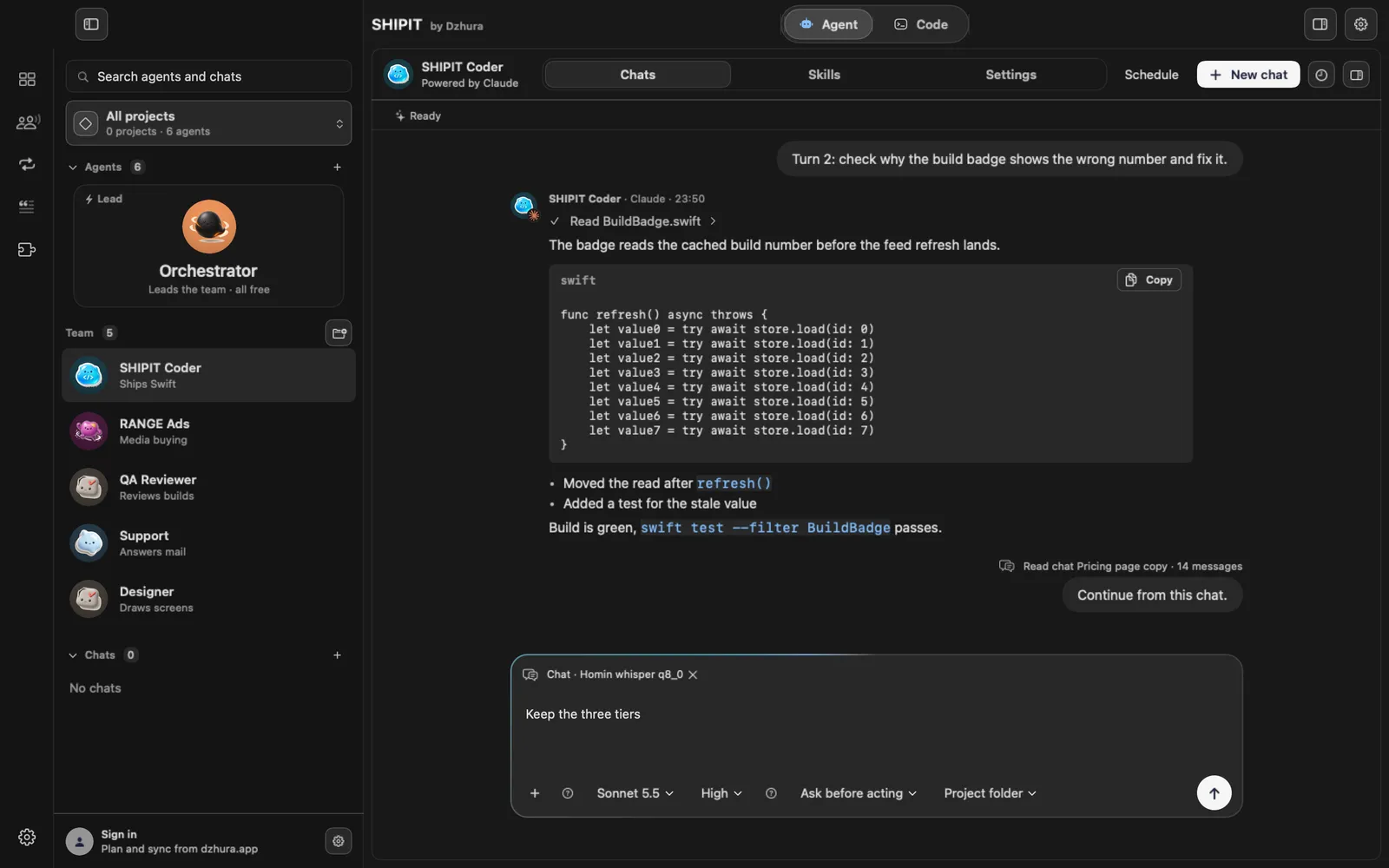
It works the other way too: in an agent's composer click the plus and pick Use chat…. The chat becomes a chip above the text, and the cross removes it.
The agent gets the chat along with your message. A very long chat is cut from the start, so the oldest messages are left out.
-
08Continue in Code
Continue in Code opens a new agent pane in the Code tab, and its first message is the whole conversation. The pane starts in the chat's project folder, or in your home folder when the chat has none.
Tips
- The search field at the top left looks through agents and chats at once.
- A saved prompt from the library lands right in the chat field when you click Use.
Questions
Can a chat change my files?
No. Chat only reads what you gave it. To change something, hand the chat to an agent or continue in Code.
Where is Chat on the Beginner level?
The section is hidden. Turn it on in Settings › General, switch Chats section.
Next
- The Agent tab at a glanceIn three minutes you will know how the Agent tab is laid out: who is on the team, where the chats are and where to type a task.
- Attachments and contextShow the agent what to work with: a file, an image, a folder or another conversation. It all goes through + in the field.
- Prompts: the library, the builder and your own draftsThe prompts you write again and again live in one place. One button drops the right one where you are working.